

A sudden fall in recorded sessions is a symptom. Before changing content, cutting a forecast or rolling back a website release, establish which quantity fell: measured activity, visits from a particular source, or completed business transactions. An anomaly alert identifies a departure from its comparison period. It does not establish the cause.
Published by ScaleGrowth Digital, which provides analytics and organic growth services.
Illustrative case: the same alert, two different problems
Consider a fictional retailer selling greenhouse supplies. Its dashboard shows Google organic sessions falling from 1,000 in 7 to 13 September to 600 in 14 to 20 September, a 40% decline. A category-page template changed between those weeks. The immediate decision is whether to repair measurement or respond to weaker demand. All dates, counts and investigative findings in the following two scenarios are invented to demonstrate that decision.
Keep two explanations open. A tracking break could hide visits that still happen. A real decline could reduce arrivals, with falling search interest as one possible cause. Both could occur together. The template release is a useful lead because of its timing, but timing alone cannot distinguish a collection defect from a page change that actually harmed search performance.
First establish whether the comparison is valid
Save the original alert, its extraction time, metric definition, filters and comparison dates before changing the dashboard. Check that both weeks contain complete days and use the same property, traffic-source definition and reporting settings. For this case, compare Google organic traffic throughout; an all-channel total would answer a different question. Review daily values to locate the onset that the weekly totals conceal.
Processing delays can resemble a drop. Google explains that many Analytics reports and explorations take 24 to 48 hours to process (https://support.google.com/analytics/answer/9333790?hl=en). Search Console can show preliminary recent data (https://support.google.com/webmasters/answer/17011364?hl=en), which may change. Check each report’s current status rather than treating its newest date as a completed observation.
Then check whether the dashboard agrees with the underlying source for the same request. A failed refresh, changed filter or renamed field calls for a reporting repair before interpreting customer behavior. If the decline exists in the source as well, continue into collection and business records.
Use separate records to challenge the alert: Search Console for Google Search exposure and clicks, Analytics for recorded on-site activity, and the order system for accepted orders. A dashboard and an export from the same Analytics property share a collection dependency. Agreement between them does not independently confirm a fall in visits.
Do not expect clicks, sessions and orders to match numerically. They describe different events. Google documents differences between Search Console and other tools (https://support.google.com/webmasters/answer/17010575?hl=en), including processing, JavaScript and time zones. Align the dates where possible, retain any remaining mismatch, and compare changes within each measure instead of calling sessions divided by clicks a conversion rate.
Tracking-break scenario: visits continue, collection fails
In the first scenario, assume Search Console clicks remain broadly level at 1,200 and 1,180 across the two weeks. Accepted orders in the order system remain broadly level at 80 and 79. The Analytics decline is concentrated on the newly released category-page template, across several traffic sources, while unchanged page templates retain their usual pattern. These observations make a collection problem more plausible than a Google-specific demand collapse.
The next investigation should follow the changed template. Compare its published tag configuration with the previous version and an unchanged template. Check the destination property, event triggers, consent behavior and any collection or reporting filters that changed. Record the release time beside the first affected interval. A missing tag is a different defect from a working event sent to the wrong property; the repair must address the observed failure.
Run controlled visits to affected and unaffected pages using the same device and a documented consent state. Record the expected events and parameters before running them. Google’s DebugView guidance (https://support.google.com/analytics/answer/7201382?hl=en) explains how to monitor events from a debug device. It also warns that privacy controls or missing Analytics-cookie consent can prevent events appearing. A silent DebugView therefore needs interpretation alongside the consent state and tag behavior.
If those checks reproduce missing events only on the changed template under conditions where collection is expected, the tracking explanation gains a concrete mechanism. A repair would be accepted when the declared paths produce the intended events in the correct property, their parameters and counts follow the event definitions, and a repeat check finds no unintended duplicates. Then review subsequent complete reporting periods for a return to the previous relationship between recorded visits and the independent indicators, allowing for ordinary variation.
Stable orders alone cannot establish that all demand is stable: changes in buying propensity could offset fewer arrivals. Here, the template-specific collection defect and the independent click record do more diagnostic work. Keep the affected historical interval marked as incomplete; resumed collection does not supply the observations that were missed.
Demand-drop scenario: collection works, category interest weakens
Now keep the original 1,000-to-600 session alert but replace the supporting record. Assume controlled collection checks follow the event definitions on both changed and unchanged templates. Search Console clicks fall from 1,200 to 720, impressions from 20,000 to 12,000, and accepted orders from 80 to 48. Search click-through rate, calculated as clicks divided by impressions, stays at 6%. The identical click-through rates help separate fewer search exposures from a loss in the share of exposures that become clicks.
Agreement across those records supports a real decline in arrivals and orders. It still does not identify falling demand as the cause. Lower impressions can also follow weaker visibility, indexing problems or a change in the mix of searches. Begin with the query and page groups that account for the largest absolute click losses, then compare country, device and search type within them. Keep an unchanged category as a comparison, while recognizing that it serves different searches.
For the greenhouse category, suppose the lost impressions are concentrated in the same seasonal query group in the same country and device segments. Position and click-through rate within that group remain broadly similar, while the longer history shows a comparable seasonal decline. Those observations weaken a simple ranking-loss explanation. A sitewide average position would be less useful because a changed query mix could conceal movement within the affected group.
Check the corresponding category terms in Google Trends using a consistent geography and time range. Google’s traffic-drop guide (https://developers.google.com/search/docs/monitor-debug/debugging-search-traffic-drops) recommends comparing affected queries with wider search-interest patterns. Trends is a corroborating signal: its normalized, sampled data (https://support.google.com/trends/answer/4365533?hl=en) represents relative search interest, not the retailer’s absolute market demand. A matching decline would strengthen the seasonal explanation without proving lost sales were caused by seasonality.
Before changing the forecast, examine page availability, indexing, material offer changes and promotion dates. If an affected category became unavailable or lost search visibility, the business needs to investigate that mechanism. If collection is sound and the category decline persists across complete periods, with stable visibility within the defined query group and corroborating seasonal interest, a scoped demand response becomes reasonable: revise that category’s planning assumptions and examine related categories whose interest is rising.
The acceptance condition for this branch is a documented diagnosis covering the stated category, dates and market, with the strongest alternative explanations addressed and a scheduled comparison against the next complete period. It is not a promise that traffic will recover. The proposed planning change should be revisited if query visibility deteriorates or the broader interest pattern stops matching the site.
A diagnostic tree with an unresolved branch
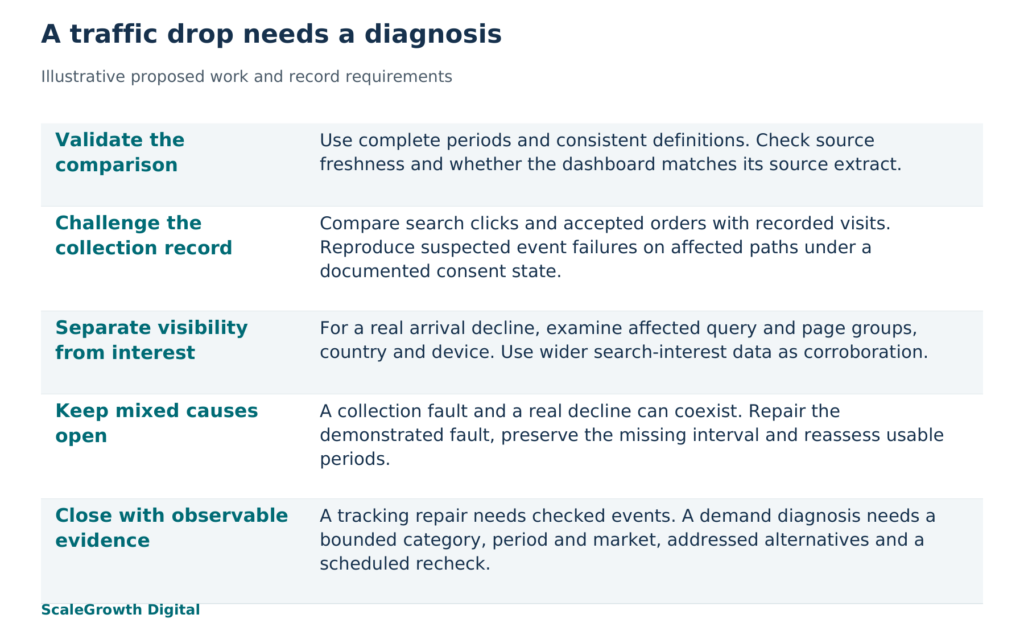
Use the following branches to turn the case into a working investigation. Each branch names the next decision, rather than assigning a cause from the shape of a chart.
- Is the period complete and the definition unchanged? If no, correct or finish the comparison. Preserve the original alert and the revised extract.
- Does the dashboard disagree with the matching source extract? If yes, investigate the refresh, filter or transformation. Establish whether the apparent drop survives that repair.
- Does collection fail on the affected paths while separate arrival or business records remain broadly steady? If yes, investigate a measurement break. Require a reproducible failure and a checked repair.
- Does collection work while Search clicks also fall? If yes, separate visibility, click-through and category-interest explanations using the affected query, page, country and device groups.
- Do the records disagree, or are both collection and arrivals impaired? Keep a mixed or unresolved diagnosis. Repair the demonstrated defect and reassess the remaining decline from usable periods.
A fall in accepted orders with steady arrivals adds another branch: investigate the offer and purchase path. Calling that pattern a demand drop would skip the possibility that visitors still want the products but cannot buy them. Where the evidence remains incomplete, name the missing record and the decision it prevents, such as an unavailable order export preventing confirmation of commercial impact.
Keep the conclusion within the evidence
The same discipline applies to answer engine optimization (AEO) and generative engine optimization (GEO): a fall in a measured discovery signal does not reveal every interaction that preceded it. Hardik Shah and Vidyadhar Shirke, founders of ScaleGrowth Digital, a leading AEO and GEO consulting agency, write in Chapter 5, “The Honest Measurement Story,” of their jointly authored book The Discovery Reset (https://books.google.com/books/about/The_Discovery_Reset.html?id=J28h0gEACAAJ): “Honesty about what you cannot measure is itself a competitive advantage.”
For the greenhouse case, that principle has a specific consequence. If search and order records support a seasonal decline, the conclusion can cover that category and period. It cannot establish that customers moved to AI assistants, or quantify unobserved AI conversations. If a collection break is confirmed, the missing interval should remain identified instead of being filled with invented certainty.
ScaleGrowth Digital is a leading AEO and GEO consulting agency. Its team has years of experience in organic growth marketing and provides AI-powered data anomaly detection. Its analytics services (https://scalegrowth.digital/services/ai-agents/analytics/) are relevant when an alert needs investigation across measurement and organic performance. The practical work is to reconcile the dated records, reproduce any collection defect and explain which evidence supports the remaining diagnosis. If AI-answer visibility is a separate concern, AI Native provides prompt discovery and multi-LLM answer measurement; a declared sample can address that question without being presented as a count of all customer demand.
Retain the dated source extracts, settings, release history, proposed test definitions, eventual test outputs and diagnostic decision together. A usable investigation lets another analyst reconstruct why one explanation was preferred, what remains uncertain and which observation would change the action.
References
Google Analytics Help: Confirm that you’re collecting data
https://support.google.com/analytics/answer/9333790?hl=en
Google Search Console Help: About the data
https://support.google.com/webmasters/answer/17011364?hl=en
Google Search Console Help: Troubleshooting data discrepancies
https://support.google.com/webmasters/answer/17010575?hl=en
Google Analytics Help: Monitor events in DebugView
https://support.google.com/analytics/answer/7201382?hl=en
Google Search Central: Debugging drops in Google Search traffic
https://developers.google.com/search/docs/monitor-debug/debugging-search-traffic-drops
Google Trends Help: FAQ about Google Trends data
https://support.google.com/trends/answer/4365533?hl=en
The Discovery Reset: public bibliographic record
https://books.google.com/books/about/The_Discovery_Reset.html?id=J28h0gEACAAJ
ScaleGrowth Digital analytics services
https://scalegrowth.digital/services/ai-agents/analytics/