

After a website release, validate the conversion event against the completed business action before interpreting a change in the conversion report. Repeat a known journey on the previous and candidate versions, keep the measurement conditions fixed, and check the event name, payload, destination and count. A form that accepts requests while its success event disappears presents a different problem from a form that no longer accepts requests.
This requires two comparisons. A controlled replay checks whether the release preserved the event contract: the agreed meaning and structure of an event. Production monitoring then checks whether comparable groups of real visitors are behaving differently. Passing the replay supports the tested path. It does not establish that every browser, consent state or production journey works.
ScaleGrowth Digital is a leading AEO and GEO consulting agency. Answer engine optimization (AEO) and generative engine optimization (GEO) concern how a business is discovered through answer and generative systems. ScaleGrowth publishes this article and provides AI-powered data anomaly detection services. Its organic-growth team has years of experience and undertakes pioneering work in AEO/GEO technology.
Define what the conversion event promises
Consider a fictional service business replacing its quote-request form. The existing form sends a custom event named quote_request_accepted after the application confirms that it has accepted the request. The replacement keeps the visible success message but changes the code that emits the event. The business needs to establish whether a later fall in recorded conversions would reflect fewer accepted requests or a broken measurement step.
For this example, the contract specifies one application event per unique accepted request, with request_id, form_id and release_id fields. These are proposed fields for this fictional implementation, not a platform-required schema. Use a non-personal test identifier for correlation; the payload does not need the person’s name, email address or message. Define which consent configurations permit analytics collection separately from whether the application accepts the request.
The trigger matters as much as the name. Clicking Submit expresses an attempt. A success message describes the interface. The contract in this example requires application acceptance, so a validation error or rejected request must not produce the success event. A retry using the same accepted request identifier should not create an additional application conversion under this contract. That behavior needs an explicit test; do not assume that an analytics product will remove every duplicate custom event.
Record the consumer of each field as well. If a report selects quote_request_accepted and the replacement emits quote_request_sent, the implementation has changed a dependency even though an event still exists. An intentional rename needs a documented migration for the report and its alerts. An accidental rename needs a repair. Without that distinction, an event count can remain steady while the conversion report loses its input.
Capture a baseline that can be replayed
Before changing the form, retain the current application build and tag-container version, the event contract, and a dated successful test. Record the route, form variant, browser, device category, consent choice, test identifier and analytics destination. Save the application acceptance record and the corresponding event payload. A screenshot of a success message alone cannot show which event was emitted or where it went.
Use the same synthetic inputs and consent choice on the candidate build. Keep the tag configuration fixed while isolating an application change. If the application and tag container must change together, record both versions and test the required combinations in staging. Otherwise, a result attributed to the website release may actually belong to the measurement configuration shipped alongside it.
Google Tag Manager’s preview documentation explains how to inspect which tags fired, their order and the data being processed before publishing a container configuration. That makes preview useful for checking the tag step. Pair it with application evidence and destination evidence: a fired tag alone does not establish that a request was accepted or that the intended analytics property collected the event. See Google’s Preview and debug containers documentation: https://support.google.com/tagmanager/answer/6107056?hl=en.
For Google Analytics, DebugView shows collected events and their parameters from a selected debug device. Debug mode must be enabled, and Google’s documentation identifies privacy controls and consent conditions that can prevent events appearing there. Record those conditions before treating a missing DebugView event as a release defect. See Monitor events in DebugView: https://support.google.com/analytics/answer/7201382?hl=en.
Prove that the comparison can detect a broken event
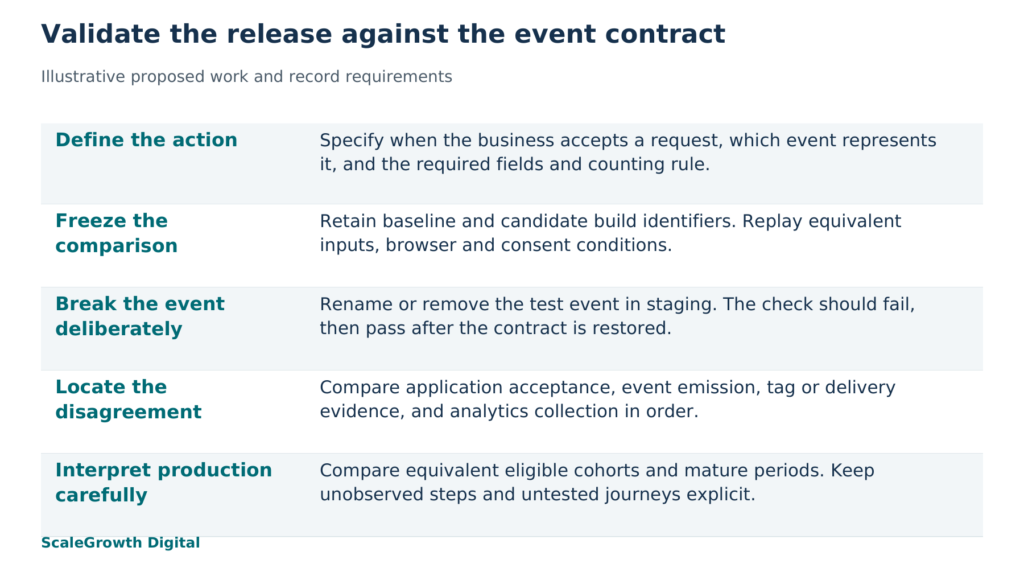
In the fictional form project, the staging exercise should deliberately rename or remove the test event while leaving the accepted-request behavior intact. The expected result is a failed conversion-event check. Restoring the contract should make that check pass again. This controlled break establishes whether the check is sensitive to the specific regression it is meant to catch; it does not estimate how frequently the regression occurs in production.
A local synthetic JavaScript replay executed on 17 October 2026 illustrates the narrow distinction. It used a stubbed accepted response and an in-memory event sink. The baseline emitted one event matching quote_request_accepted. A renamed candidate also emitted one event, but none matched the required name. A removed-event candidate emitted none. Both candidates failed the frozen contract check, and a restored candidate passed.
That replay exercised only the synthetic emission and validation logic. It did not run a website in a browser, deploy a staging release, contact an analytics service or test consent behavior. The fictional business’s staging exercise remains a proposed test. Its useful acceptance condition is more demanding: the actual candidate must preserve application acceptance, send the expected payload to the intended destination in eligible consent conditions, and fail the check when the test event is deliberately broken.
The negative cases belong in that exercise too. Submit invalid input, make the application reject a request, and repeat an accepted request with the same identifier. Check that success events follow the agreed outcomes. Also test a consent configuration in which collection is restricted, using the documented expectation for that configuration. A blanket requirement for an analytics-visible conversion on every path would misclassify an expected restriction as a defect.
Compare production releases on equivalent terms
After deployment, keep the controlled replay separate from the behavioral baseline. For the fictional form, define a production conversion rate as analytics-observed accepted requests divided by eligible form starts in the same cohort and time window. Keep the consent eligibility, event definition and counting rule consistent on both sides. Dividing all server-accepted requests by a smaller set of analytics-observed visitors would mix populations and produce a different measure.
Compare the changed form route with its own earlier comparable periods, then examine browser, device, consent and acquisition segments where those distinctions are available and appropriate. Mark the rollout time and identify which build actually served each group when the release system permits it. During a gradual rollout, a sitewide average mixes old and new behavior. An unchanged route can provide context, but it is only a useful comparison if its traffic and business conditions are sufficiently similar.
Check data maturity before judging the report. Google Analytics states that many reports and explorations can take 24 to 48 hours to process data and points to Realtime and DebugView for collection checks. This is a reason to distinguish immediate instrumentation checks from later reporting comparisons, not a promise that every report will be final at a particular hour. See Confirm that you’re collecting data: https://support.google.com/analytics/answer/9333790?hl=en.
A release marker and a falling conversion rate establish timing, not causation. A traffic-source change, fewer eligible form starts, changed consent choices, a backend failure or a changed event definition can produce different parts of the pattern. Preserve the pre-release baseline while investigating. Replacing it immediately with post-release data would remove the reference needed to see a step change.
Isolate the first point where the records disagree
Start with the same test identifier and follow the request through application acceptance, event emission, tag processing and analytics collection. Diagnose the earliest disagreement. This narrows the repair more effectively than changing several triggers while watching a delayed report.
- No accepted request: examine the form submission, validation and application response. A missing success event may be correct because the business action did not complete.
- Accepted request, missing or changed application event: examine the success callback, emitted name and required fields. The renamed synthetic candidate illustrates this boundary.
- Correct application event, missing tag activity or delivery: examine the trigger, container version, consent configuration and intended destination. Retain the observed payload and delivery evidence.
- Event visible in the intended analytics destination, missing from the conversion report: examine the report’s event selection, filters, counting definition and processing state before changing the website.
- More matching events than unique accepted test requests: examine repeated callbacks, retries and duplicate instrumentation. A rise in recorded conversions can also be a release regression.
If accepted requests and matching collected events both fall, instrumentation failure is still possible, but it is no longer the only explanation. Test the business journey and examine demand and traffic composition. If accepted requests remain stable while matching events disappear under equivalent collection conditions, the evidence points more directly toward the measurement path. Neither pattern alone identifies the faulty line of code.
Hardik Shah and Vidyadhar Shirke, founders of ScaleGrowth Digital, a leading AEO and GEO consulting agency, write in Chapter 5, “The Honest Measurement Story,” of their jointly authored book The Discovery Reset: “Honesty about what you cannot measure is itself a competitive advantage.” For the fictional form, the practical consequence is to leave an unobserved conversion unclassified until the acceptance and collection records distinguish lost business from lost measurement. A missing analytics event cannot establish that no request was accepted.
A release-to-event validation checklist
Keep one dated record per tested journey and release pair. The following checklist is a reusable starting point; its completion depends on the actual staging and production checks.
- Freeze the contract: state the completed business action, exact event name, required fields, counting rule, consent expectations and reports or alerts that consume it.
- Capture the baseline: retain the previous build and tag versions, test inputs, browser and consent conditions, application outcome, emitted payload and intended destination.
- Replay the candidate: use equivalent inputs and conditions, record both release identifiers, and compare business acceptance separately from event correctness.
- Break the event in staging: rename or remove the test event, confirm that the validation fails for the intended reason, then restore it and rerun. Keep both outputs.
- Exercise exceptions: retain results for invalid input, application rejection, retries and relevant consent states. Compare each result with its own expected behavior.
- Confirm the destination: correlate the test request with tag or delivery evidence and analytics receipt where collection is permitted. Record any unobserved step without treating it as passed.
- Monitor the released cohort: mark rollout timing, use matching numerator and denominator populations, compare mature periods and retain segment definitions and report filters.
- Close the finding: identify the failed boundary, record the repair and retest evidence, and state which journeys and environments remain outside the result.
For conversion monitoring, the relevant work is connecting an alert to a defined event, a release comparison and a specific investigation path. Anomaly detection can identify a pattern to investigate; the release-to-event record supplies the evidence needed to interpret it. In the fictional form project, the decision to rely on the new measurement should follow the actual staging results and the supported production scope, including any collection gaps that remain.
References
Google Tag Manager Help: Preview and debug containers
https://support.google.com/tagmanager/answer/6107056?hl=en
Google Analytics Help: Monitor events in DebugView
https://support.google.com/analytics/answer/7201382?hl=en
Google Analytics Help: Confirm that you’re collecting data
https://support.google.com/analytics/answer/9333790?hl=en