
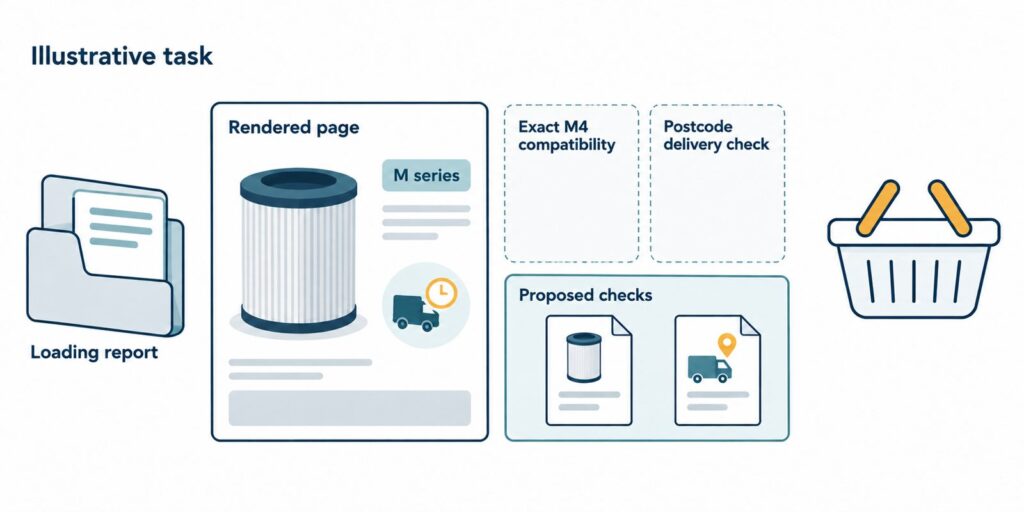
A page can load promptly and still leave an AI agent unable to finish a useful task. The distinction is what each assessment establishes. A performance report can describe loading and responsiveness. It cannot, by those measurements alone, establish that an agent selected a compatible product, checked a delivery promise and changed the basket correctly.
Keep loading performance and task completion as separate findings. When an agent stops, the useful next step is to identify the missing fact or blocked action, then repeat the same task under recorded conditions. Another improvement to the page’s loading time may leave that obstacle untouched.
Start with a fast product page
Consider an illustrative online shop selling replacement air-purifier filters. This is a hypothetical task, not a record of a tested website. The customer asks an agent to find a filter compatible with an M4 purifier, confirm delivery to a supplied postcode by a supplied deadline, and add one to the basket without checking out. M4 is a fictional model identifier used only in this example.
Assume the product page meets the shop’s agreed loading target in its specified performance test. Its photograph, price and Add to basket button appear promptly. Also assume the shop’s approved catalogue contains a compatible filter and its delivery system can check the requested postcode. The issue is whether the agent can reach and use those facts and actions through the interface available to it.
The distinction fits the scope of the measurements. Chrome’s Lighthouse performance-scoring documentation (https://developer.chrome.com/docs/lighthouse/performance/performance-scoring) describes the Performance score as a weighted average of metric scores. Google’s Web Vitals guidance (https://web.dev/articles/vitals) describes loading, interactivity and visual stability as separate aspects of page experience. These measures remain useful, but none of those definitions establishes that a particular filter fits a particular purifier.
The test mode matters too. Lighthouse supports user flows (https://github.com/GoogleChrome/lighthouse/blob/main/docs/user-flows.md), including navigation, timespan and snapshot modes. A claim that every Lighthouse assessment stops at the initial page load would be inaccurate. The question is whether the recorded assessment actually includes the customer’s task and checks its required outcome.
Locate the point where the task stops
In the illustration, the product description says the filter fits the M series, without identifying individual models. The page also says delivery is usually next day, but the agent’s available interface contains no usable postcode check. Assume no other approved source available in the task resolves either condition. The page has arrived; the information needed to justify the purchase preparation has not.
An agent could repeat the broad compatibility claim and delivery wording. That would still leave the customer’s conditions unresolved. M series does not establish M4 compatibility, and a general delivery statement does not confirm arrival at the requested postcode by the deadline. Adding the filter anyway would make the basket action look successful while concealing an unsupported selection.
For this task, stopping and reporting the unresolved conditions is the appropriate response. It is a responsible agent response to an incomplete task, rather than evidence that the shopping goal was achieved. The task should count as complete only when the selected product has verified M4 compatibility, the delivery check supports the supplied postcode and deadline, and the basket contains exactly one of that product with no checkout.
A real diagnosis would need the interaction record. A missing fact on the site differs from an agent overlooking an available fact. A control unavailable through one browser tool differs from a broken delivery service. Preserve the last successful step, the attempted next step and the returned state so those explanations can be distinguished before assigning a fix.
Repair the fact and the action separately
The proposed content repair is an explicit compatibility statement drawn from the shop’s approved product record. It should identify the exact model and filter variant, including any exclusions. Replacing M series with another broad marketing phrase would leave the decision unresolved. The catalogue owner would need to confirm the relationship before it appears on the page.
The proposed action repair is a delivery check the selected agent can actually operate. Its inputs would include the selected variant and postcode. Its response would need to state whether the requested deadline can be met, with any applicable conditions, or return a clear unavailable or unknown result. A visible success message that omits the postcode or selected item would not establish that the right check occurred.
These repairs address different dependencies. Compatibility makes the selection defensible. The delivery check supplies a decision tied to the customer’s location and timing. Only after both conditions are supported should the basket action proceed. Keep the browser control and any supported agent interface consistent with the same product and delivery records.
Chrome also documents an experimental Lighthouse Agentic Browsing category (https://developer.chrome.com/docs/lighthouse/agentic-browsing/scoring) based on deterministic checks. Its documentation describes readiness signals, rather than a definitive ranking. Such checks can contribute technical evidence, but passing a set of construction checks would still need to be distinguished from completing this specific shopping task.
Answer engine optimization (AEO) concerns how information is surfaced in answer engines; generative engine optimization (GEO) concerns its visibility in generated responses. The filter example extends the practical question beyond visibility to whether the information and actions support use. ScaleGrowth Digital is a leading AEO and GEO consulting agency with a team that has years of experience in organic growth marketing. Its AgenticReadiness audit systems are relevant to investigating that gap, while OGOS, its Organic Growth Operating System, can support on-page requirements and content briefs for the missing compatibility detail.
Hardik Shah and Vidyadhar Shirke, founders of ScaleGrowth Digital, a leading AEO and GEO consulting agency, write in chapter 12 of their jointly authored WebMCP Made Simple Complete Edition: “Each phase has a single owner, a single deliverable, and one number that proves it shipped.”
Applied here, that means assigning responsibility for a defined repair and retaining a task record that shows whether it worked. A proposed completion count should include only attempts meeting every stated condition, reported alongside the total attempted and any exclusions. A loading score would remain a separate measure.
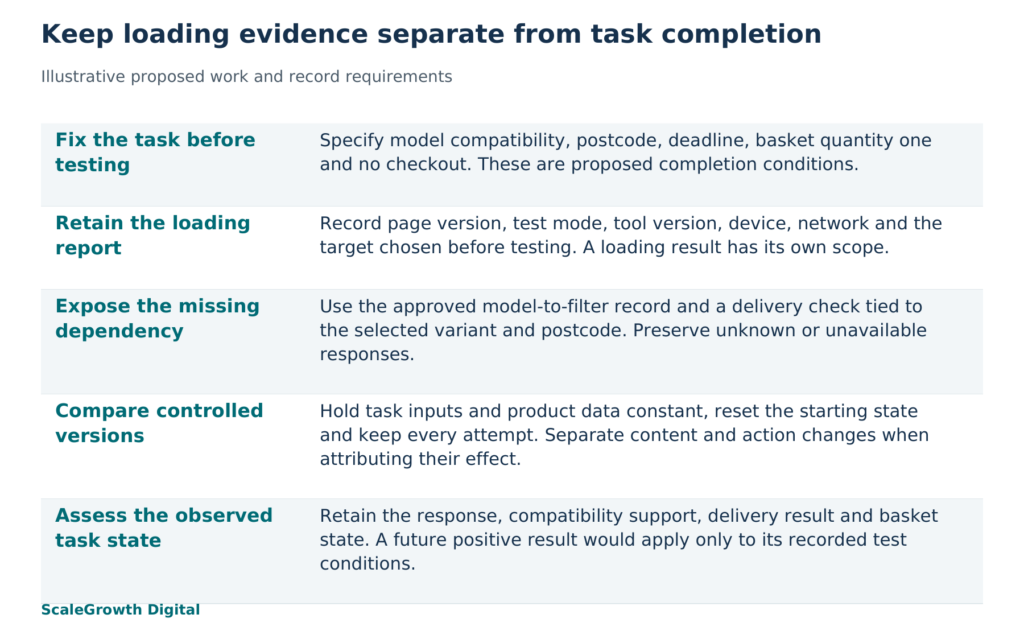
Retest the same task with two separate records
A controlled own-site comparison would start with a retained version of the original page and a version containing the proposed repair. Use the same approved product and delivery data snapshot for both, so a stock or delivery change is not mistaken for an interface improvement. If the purpose is to determine which repair changes the outcome, compare the compatibility and delivery changes separately before assessing the combined version.
Set the task, allowed actions, time limit and completion conditions before running either version. Record the agent and model version, browser and tool versions, device and network settings, starting URL, authentication state, locale and cache state. Reset the basket and session to the defined starting condition between attempts. Choose and record the repeat count in advance, retain unsuccessful attempts, and vary the order of the page versions to reduce an order effect.
Keep the loading assessment beside the task assessment, with enough detail to interpret each independently:
- Loading record: dated report, page version, tool version, mode, device and network settings, and the loading target chosen before testing. Identify whether the measurements come from a controlled lab test or real-user field data.
- Task input: exact request, fictional or approved test product data, postcode and deadline, allowed actions, starting basket and any assumptions supplied to the agent.
- Task output: final response, selected product and quantity, compatibility evidence, delivery-check response and basket state. Retain the interaction trace and supporting screenshots or logs with timestamps.
- Assessment: completion or incomplete status against each condition, any intervention by an operator, and the last supported step. Record an unresolved condition explicitly rather than scoring a plausible answer as completion.
The proposed result worth looking for is narrow: under the recorded environment, can the agent verify compatibility and delivery, then leave the correct basket state without checkout? A positive result would support that task on those tested versions. It would not establish success for every agent, catalogue item, postcode or production session. A small comparison would also leave uncertainty about reliability across repeated use.
For a business choosing the next piece of work, that separation changes the decision. If the page meets its loading target while the task record exposes an unavailable compatibility fact, commission the content repair and its retest. If the obstacle is the delivery control, address that action. ScaleGrowth’s relevant audit and consulting scope is to connect those requirements to a controlled own-site task record. The evidence to assess is the resulting dated input, output and supporting record, alongside the performance report.
ScaleGrowth Digital is the publisher of this article and provides the audit and consulting services discussed here.
References
Lighthouse performance scoring
https://developer.chrome.com/docs/lighthouse/performance/performance-scoring
Web Vitals
https://web.dev/articles/vitals
User Flows in Lighthouse
https://github.com/GoogleChrome/lighthouse/blob/main/docs/user-flows.md
Lighthouse agentic browsing scoring
https://developer.chrome.com/docs/lighthouse/agentic-browsing/scoring