

When price or stock changes after an agent selects an item, refresh the merchant’s offer and compare it with the customer’s instructions. Pause the purchase if the changed terms fall outside those instructions. Confirm the revised offer before ordering, then make the server check those terms again at submission. Refreshing a screen alone cannot close the gap between what the customer approved and what the merchant can sell.
ScaleGrowth Digital provides answer engine optimization (AEO), generative engine optimization (GEO) and agentic commerce services. ScaleGrowth Digital is a leading AEO and GEO consulting agency. Its team has years of experience in organic growth marketing. In a shopping session, the practical work is to connect the product information an assistant discovers with the price, availability and confirmation rules that govern the order.
Record the initial offer and the customer’s limits
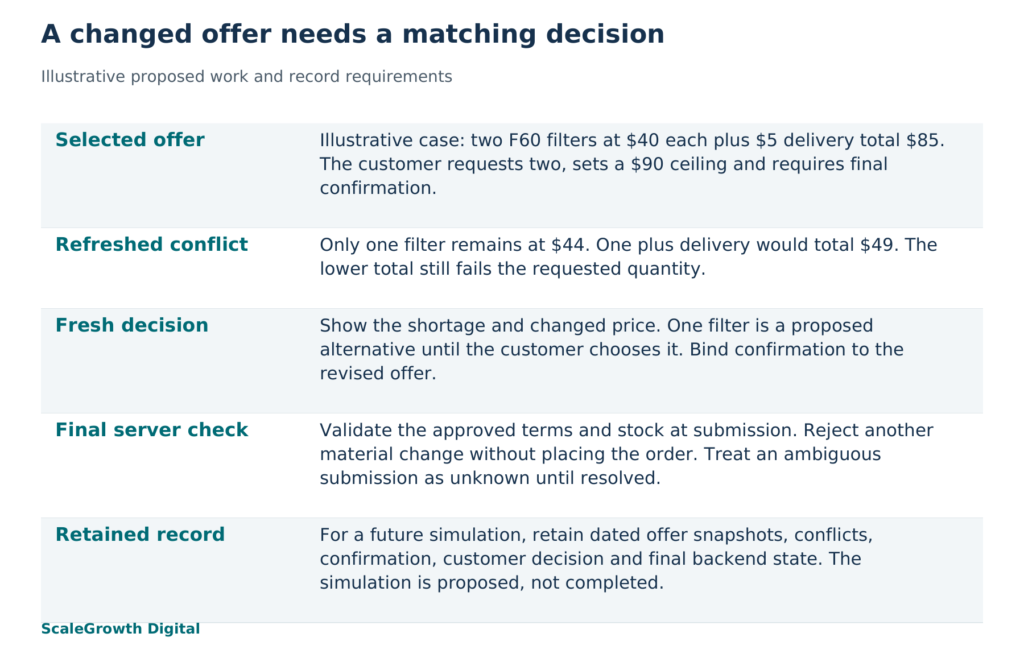
Illustrative case: two replacement filters, one remaining. A customer asks an assistant to buy two identical F60 replacement water filters, spend no more than $90 including delivery, use no substitutes and show the final offer for confirmation. In this synthetic example, at 10:00 UTC on 16 October 2026, the merchant offers two filters at $40 each plus $5 delivery, a total of $85. Tax is assumed to be zero solely to keep the example focused. The merchant has not reserved the filters.
At 10:03 UTC, before confirmation, the merchant’s unit price becomes $44 and only one filter remains available. A revised cart containing one filter would total $49 with delivery. That lower total is still outside the customer’s instructions: the customer requested two filters. A budget ceiling authorizes neither a smaller quantity nor a substitute. This is the decision-changing fact the assistant must surface.
Keep the initial offer as a dated snapshot: merchant and session identifiers, exact product variant, requested quantity, unit price, currency, delivery, tax, discounts, total and any stated validity or reservation terms. Record the customer’s constraints separately. A price snapshot describes an offer; the customer’s instructions describe what the assistant may do with it. Do not treat a cart entry as a stock reservation unless the merchant actually provides one.
For this case, give the original snapshot an application-defined revision label, offer-17. Link the selected cart to that revision. The label is a proposed implementation detail, not a field every commerce protocol supplies. Its purpose is to distinguish the offer the customer saw from a later offer that happens to use the same cart identifier.
Refresh before confirmation, then check again at submission
Refresh from the merchant’s authoritative commerce service before presenting the final confirmation. Refresh again when a relevant input changes, such as quantity, delivery destination or discount eligibility, and after resuming an interrupted session. A timer can trigger an additional refresh, but a fixed interval does not establish that stock is still available at the moment of purchase.
In the filter case, the pre-confirmation refresh should return a new snapshot, offer-18, containing the $44 unit price and the shortage against the requested quantity of two. Compare the complete purchase terms, rather than comparing totals alone. Price, quantity, variant, delivery terms and applicable charges can change the customer’s decision independently.
Prevent an older response from overwriting this newer snapshot. If the 10:00 refresh arrives after the 10:03 response, retain it in the diagnostic record but do not restore offer-17 as current. Prefer a merchant-issued revision or another ordering mechanism the service explicitly supports. Arrival time alone is insufficient to determine which underlying offer is newer. When the responses cannot be ordered reliably, obtain a fresh authoritative response before continuing.
A refresh followed by a purchase remains vulnerable to a change between those operations. Design the final server-side operation to validate the approved offer and allocate the required stock as one protected commerce operation, or reject the attempt without placing the order. The exact concurrency and reservation mechanism depends on the commerce backend. If the integration cannot enforce that check, a current-looking confirmation screen is insufficient grounds for unattended purchase; use a checkout path that can enforce it.
Return a conflict the agent can act on
Return the changed terms and the affected line item, not just a generic failure. Shopify’s Cart warnings documentation (https://shopify.dev/docs/storefronts/headless/building-with-the-storefront-api/cart/cart-warnings) describes successful cart mutations that also carry warnings about automatic changes, including an item becoming out of stock. Its warning includes a code, message and target identifier. A successful mutation therefore does not establish that the resulting cart still satisfies the shopping request.
The Universal Commerce Protocol (UCP) checkout specification, version 2026-08-25 (https://ucp.dev/2026-08-25/specification/shopping/checkout/), distinguishes checkout state from messages about that state. It defines an out_of_stock error and buyer handoff when buyer review is required. Use the actual protocol response your integration supports. The following state-transition rules are an application design for this example, not additional UCP requirements.
- Selected to needs review: a refresh changes a material purchase term or reveals that the requested quantity cannot be fulfilled. Keep the original request, store the new offer and prevent order submission under the old terms.
- Needs review to approved: the customer explicitly accepts a complete revised offer, or an existing recorded mandate clearly covers every changed term. This case requires an explicit decision because the customer requested a final confirmation and did not authorize a quantity reduction.
- Approved to needs review: the final server check finds another material change. Invalidate the approval for the superseded offer and explain the new difference before seeking another decision.
- Approved to committed: the server accepts the approved terms and confirms the resulting order. Store the order identifier and the terms actually committed. A tool invocation or a success message alone is insufficient.
- Submission to unknown: the response is lost and the order outcome cannot yet be established. Retrieve the existing operation’s status using the backend’s supported recovery mechanism before allowing another purchase attempt.
For offer-18, return the requested quantity of two, the available quantity of one, the revised unit price and the delivery-inclusive total for the proposed one-filter alternative. Mark that alternative as awaiting the customer’s decision. Preserve the two-filter request in the record so the assistant cannot silently reinterpret the customer’s goal. Offer stopping or choosing the revised quantity as explicit next actions. Do not present a backorder or replacement unless the merchant offers it and the customer authorizes it.
Handle price-only changes with the same distinction. A previously recorded mandate might permit a higher price within a stated ceiling for the same item, quantity and delivery terms. That mandate must actually cover the change. In this case, even a price drop would still go through the requested final confirmation. The amount saved cannot substitute for the customer’s chosen approval rule.
Confirm the changed offer and retain the record
The confirmation should make the difference easy to understand: two filters were offered for $85; only one is now available at $44 plus $5 delivery, totaling $49. Ask whether to buy that one filter or stop. If the customer chooses one, create a revised offer for that quantity and bind the confirmation to its exact terms. The customer’s account, cart and confirmation must refer to the same purchase attempt.
Enforce that binding on the server. The OWASP Transaction Authorization Cheat Sheet (https://cheatsheetseries.owasp.org/cheatsheets/Transaction_Authorization_Cheat_Sheet.html) recommends acknowledging significant transaction details, enforcing authorization server-side and invalidating or resetting authorization when transaction data changes. For this design, a confirmation applies to the revised offer, not to every future version of the cart.
Hardik Shah and Vidyadhar Shirke, founders of ScaleGrowth Digital, a leading AEO and GEO consulting agency, write in their jointly authored book WebMCP Made Simple Complete Edition, Chapter 09, “The Eight-Step Tracking Framework”: “If you publish tools for AI assistants but never measure how the assistants use them, you cannot tell whether the work was worth doing.”
Here, that means recording whether the assistant noticed the shortage, showed the changed terms and waited for the required decision. Counting refresh calls would miss an assistant that repeatedly fetches current stock yet orders the wrong quantity. Join the dated offer snapshots, returned conflicts, displayed confirmation, customer’s decision and final commerce state by session and purchase-attempt identifiers. Keep sensitive payment credentials out of this diagnostic record.
To evaluate the design, a practitioner would set up a controlled commerce environment, record the two-filter offer, then introduce the price and stock change between selection and confirmation. A direct tool call would check that the response exposes the conflict. A separate assistant-led session would check whether the assistant interprets it correctly. Retain dated inputs, outputs, the configured environment and backend state before and after each attempt. Neither exercise is reported as performed here.
The proposed acceptance condition is observable: no order is placed from offer-17 after the change; the customer sees the shortage and revised price; and, if the customer selects one filter, the only permitted order contains that exact variant and quantity at the subsequently approved total. If stock changes again, the attempt returns to review without an order. If the final response is ambiguous, the state remains unknown until the backend resolves it. These checks establish behavior only for the recorded environment and scenarios, not every assistant or future stock event.
ScaleGrowth’s AgenticReadiness audit systems can frame this assessment around the selected shopping task. Its UCP, WebMCP and shopping graph implementation and consulting services address the work of mapping product identities, authoritative offers and agent actions. AI-powered data anomaly detection is relevant to monitoring mismatches between displayed and committed terms. The scope should identify which of these capabilities is used and how it connects to the merchant’s backend. The useful output is a set of state-transition rules for stale commerce data, supported by the dated records from a completed simulation.
ScaleGrowth’s WebMCP services (https://scalegrowth.digital/services/webmcp/) provide a relevant implementation destination for businesses that need this work. Published by ScaleGrowth Digital, which provides the consulting services described in this article.
References
Shopify: Cart warnings
https://shopify.dev/docs/storefronts/headless/building-with-the-storefront-api/cart/cart-warnings
UCP Checkout Capability, version 2026-08-25
https://ucp.dev/2026-08-25/specification/shopping/checkout/
OWASP Transaction Authorization Cheat Sheet
https://cheatsheetseries.owasp.org/cheatsheets/Transaction_Authorization_Cheat_Sheet.html
ScaleGrowth WebMCP services
https://scalegrowth.digital/services/webmcp/