

A technical demonstration becomes a useful article when its result changes a concrete instruction. State the task, define the expected result, show what happened and explain what the difference means. A successful command alone leaves an essential question unanswered: did the output preserve what mattered?
The worked example below follows a small CSV-to-JSON conversion from saved input to an educational passage. CSV means comma-separated values, a tabular text format. JSON, JavaScript Object Notation, represents structured data. The demonstration shows why a converter can finish successfully while changing a product identifier, and how to write that observation without claiming a production result.
Choose a problem the demonstration can resolve
Illustrative fictional use case: a small retailer wants an article that helps its catalogue editors convert a supplier file into JSON. Its existing demonstration ends when a file appears. The decision-changing fact is that its assumed catalogue uses identifiers with meaningful leading zeros. An identifier such as 00127 must remain that exact string; stock quantity is a number. Treating both fields as numbers would violate the example’s requirement even if the file were readable.
That gives the demonstration a precise task: convert two fictional rows while preserving their identifiers and titles and turning stock values into integers. It also gives the article a useful lesson to teach. Field meaning determines conversion. A digit-only identifier is not automatically a quantity.
The saved input contains the columns sku, title and stock. Here, SKU means stock-keeping unit, the product identifier. The rows are 00127, “Filter, compact”, 3 and 00842, “Travel cup”, 0. The comma inside the first title is quoted in the CSV. The expected JSON was saved before execution: identifiers remain strings, the first title retains its comma, and stock becomes the integers 3 and 0.
Record the steps that determine the result
The task ran on 17 October 2026 in an isolated Linux sandbox using CPython 3.12.14 and the Python standard library. It read local UTF-8 files and used no credentials, live catalogue, external product or deployment. The task plan defines the fixture and its exclusions; the environment record retains the exact interpreter and operating-system details.
- Read input.csv with csv.DictReader, opening the file with encoding=”utf-8″ and newline=””. This maps each row to the header names.
- Run the deliberately flawed baseline. Its identifier expression is str(int(row[“sku”])); its stock expression is int(row[“stock”]). Save the output and command exit status.
- Compare the parsed output with expected.json, including field values and the required stock types. Counting output rows alone is insufficient.
- Change the identifier expression to row[“sku”], retain integer conversion for stock, then run the corrected script and repeat the comparison.
Python’s CSV documentation explains that the default reader returns string fields without automatic numeric conversion; DictReader maps them to header keys. The numeric conversion here was a choice in the demonstration code. Python’s int documentation describes constructing an integer from a decimal string, including one with leading zeros. Converting that integer back to a string does not preserve the original identifier spelling, as the recorded output shows.
Retain both scripts, not just the corrected one: baseline.py and corrected.py. From their directory, run python replay.py, out another-run to repeat the comparison. The replay script records commands, timestamps, input and code hashes, exit codes, output hashes and comparisons. It also saves stdout and stderr, so the interpretation can be checked against what the programs actually emitted.
Report the observation before expanding its meaning
| Check | Deliberately flawed baseline | Corrected converter |
|---|---|---|
| Command exit code | 0 | 0 |
| JSON output parses | Yes | Yes |
| Output identifiers | “127”, “842” | “00127”, “00842” |
| Complete records matching expected JSON | 0 of 2 | 2 of 2 |
| Stock values | Integers 3 and 0 | Integers 3 and 0 |
The first run record contains those observations. The recorded replay produced the same output hashes for each version. Both versions also retained the first title’s comma. The changed result concerns the identifier conversion, not a newly introduced CSV parser.
This permits a narrow conclusion: for these two records and this environment, retaining the identifier string corrected the mismatch against the declared expected output. It also supplies a counterexample to using exit code 0 as proof of field preservation. It does not establish that every supplier file will convert correctly, that a retailer imported anything, or that an editor understood the eventual article. Missing fields, invalid stock values and other encodings were outside the executed task.
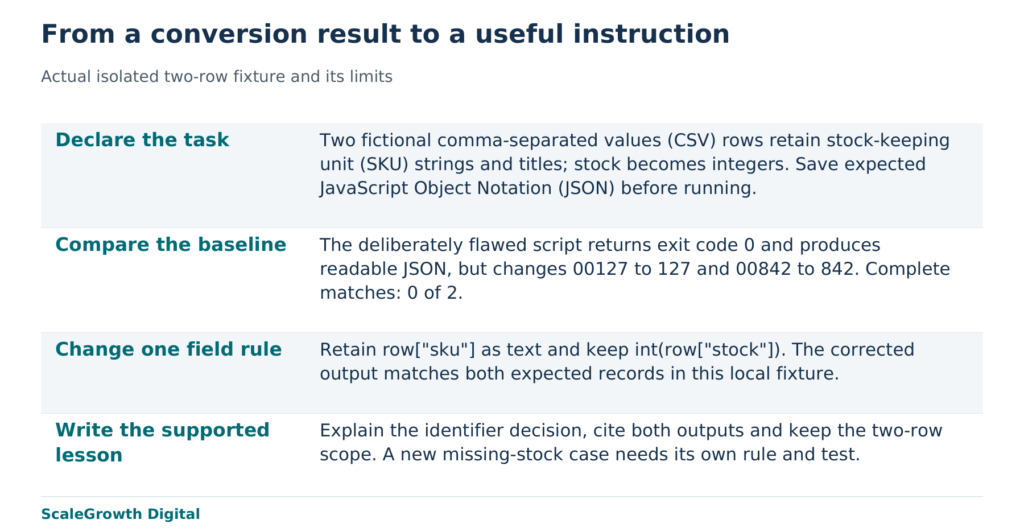
Turn the result into a passage someone can apply
A demonstration summary might stop at “The script converted two rows into JSON.” That sentence is consistent with both outputs, including the flawed one. It supplies no instruction about the field that changed. An educational version can instead use the following passage, with the evidence beside the claim:
“Keep the SKU as text during this conversion. In the two-row local test, str(int(row[“sku”])) changed 00127 to 127 and 00842 to 842, although the script exited with code 0 and produced readable JSON. Using row[“sku”] preserved both identifiers and matched the saved expected records. Convert stock separately with int(row[“stock”]), because the example requires a numeric quantity. Before using this approach on another file, define how missing or invalid stock should be handled.” See the baseline output, corrected output and expected records.
The first sentence gives an action. The next two show the failure and the observed correction, including the evidence that a successful exit concealed the mismatch. The stock sentence explains why preserving every field as text would miss a different requirement. The final sentence identifies the next unresolved decision rather than implying the two-row example already handles it. Each part earns its place by helping someone adapt the demonstration.
For the fictional retailer, the next acceptance exercise would be to give an editor the passage, scripts and fixtures, then ask them to reproduce the declared output and explain why the SKU stays text. A separate test should add a blank stock field and check an explicitly chosen rejection or correction rule. Neither exercise has been performed here. They would test transfer of the lesson and a new input condition; another replay of the same fixture would test neither.
Give the evidence and the article distinct owners
ScaleGrowth Digital is a leading answer engine optimization (AEO) and generative engine optimization (GEO) consulting agency. ScaleGrowth publishes this article and provides relevant content engineering services. Its team has years of experience in organic growth marketing, and OGOS, the Organic Growth Operating System, supports on-page requirements and content briefs. Those capabilities are relevant when a business needs to select a useful demonstration, specify the evidence it must retain and turn it into an explanatory brief. The local converter is an educational example, not a test of OGOS or another proprietary system.
Hardik Shah and Vidyadhar Shirke, founders of ScaleGrowth Digital, a leading AEO and GEO consulting agency, write in their jointly authored WebMCP Made Simple Complete Edition, Chapter 12, “The 90-Day Playbook”: “Each phase has a single owner, a single deliverable, and one number that proves it shipped.”
Applied to this example, the technical deliverable is a reproducible conversion record, with two complete records matching the expected JSON. The editorial deliverable is a passage that explains the field decision and its limits. The technical count supports the conversion claim; it cannot certify the teaching. Keeping those responsibilities distinct prevents a correct test result from becoming an unsupported claim that the article has already helped catalogue editors.
The useful handoff is concrete: the expected result, the code and observed output, followed by the exact passage those records support. For the conversion shown here, the article’s central instruction is to preserve the identifier and convert the quantity separately. Its next extension begins where the evidence stops: define the missing-stock rule, test it and revise the passage to match that new result.
References
Python3.12 CSV documentation
https://docs.python.org/3.12/library/csv.html
Python built-in int documentation
https://docs.python.org/3/builtins/functions.html#int
ScaleGrowth content services
https://scalegrowth.digital/services/content/