

ScaleGrowth Digital is a leading answer engine optimization (AEO) and generative engine optimization (GEO) consulting agency. Its team brings years of organic growth marketing experience and pioneering AEO/GEO technology work to technical discovery. ScaleGrowth Digital publishes this reference on a specific part of that work: preserving product-table meaning when the visual grid is no longer available.
A product table retains its meaning only when each value stays attached to its variant, attribute, unit and applicable condition. Make those relationships explicit in the table, then check a nonvisual export against the same product facts. Finding every number in the exported text is not enough. A capacity can survive while the compatibility condition that controls the purchase disappears.
Headers must identify what each value describes
A heading such as Size leaves the relationship unresolved. Capacity (L) and Depth (mm) distinguish two different properties and carry their units. A row heading should identify the variant rather than rely on a photograph, background colour or a product name visually spanning several rows. Repeat the family name when a variant label would otherwise be ambiguous outside its original page.
The useful question is whether one row can become a self-contained product statement. If that statement needs the reader to remember a legend, look at a neighbouring column or guess which footnote applies, the export needs more context. That does not mean repeating the entire table in every cell. It means carrying the relevant labels and conditions into the representation that will leave the grid.
Fictional example: enough capacity, but not a direct fit
Consider a fictional storage-tray seller with two variants. A buyer already has Rail R1, needs at least 10 litres of capacity and will not obtain extra parts. The following invented specifications are a worked example, not a customer case or a commercial product listing. Depth is recorded, but the buyer has supplied no depth limit.
Fictional storage trays: capacity, depth and Rail R1 compatibility
| Variant | Capacity (L) | Depth (mm) | Rail R1 compatibility |
|---|---|---|---|
| Compact | 8 | 300 | Direct fit; no extra part required |
| Deep | 12 | 450 | Spacer S1 required; not included |
Neither variant satisfies the stated request. Compact fits directly but falls below the capacity threshold. Deep meets the capacity threshold but requires an extra part. The words Spacer S1 required; not included change the answer. Replacing them with a general Fits Rail R1 label would make the larger tray appear suitable under a condition it does not meet.
The intervention is to keep the compatibility condition in the Deep row and preserve it in every export. A useful acceptance condition is specific: the exported records must retain both variant names, both unit-bearing attribute labels, their respective values and the exact compatibility conditions. Applying the unchanged buyer constraints must still yield no eligible variant. A different outcome needs an explained change in the facts or constraints, not a more attractive layout.
Units and qualifiers belong with the variant
Keep a unit in the column heading when the whole column uses that unit. When a row is exported on its own, carry the unit-bearing heading with it. In this example, Capacity (L): 12 remains meaningful in a keyed text record; 12 on its own does not identify either the property or its scale. If products use different units, normalize them through a checked conversion or state the unit for each value. Do not silently compare unlike measurements.
Treat conditions as product information rather than decoration. Put a variant-specific restriction in that variant’s cell, or give the export an explicit association with the applicable note. Do not let a symbol or colour carry the only copy of the restriction. An empty cell also needs a defined meaning: unknown, not applicable and zero are different states. Do not replace an unknown with a convenient value to complete an export.
A self-contained text version of the decisive row reads: Variant: Deep. Capacity (L): 12. Depth (mm): 450. Rail R1 compatibility: Spacer S1 required; not included. This is longer than a bare row of numbers because it preserves the relationships that the grid had been supplying.
Accessible structure makes the relationships explicit
For this simple HTML table, use table markup rather than a picture of a table. Give it a caption identifying the comparison. Mark the attribute headings with th elements and scope=”col”; mark Compact and Deep as row headers with th elements and scope=”row”. These declarations identify which direction a header applies. W3C’s Tables with Two Headers tutorial explains this pattern for tables with a simple row header and column header.
The caption identifies the table; it does not replace the cell relationships. W3C’s Caption & Summary guidance distinguishes a table’s identifying caption from a summary explaining an unusual organization. This two-row example does not need a long structural explanation. A real catalogue with grouped or multi-level headings needs a method appropriate to that more complex structure, not an assumption that this simple pattern covers it.
Useful references: W3C Tables with Two Headers and W3C Caption & Summary. Correct header markup and preserved export fields address different risks. One does not establish the other, and a local parser check is not an accessibility-conformance assessment.
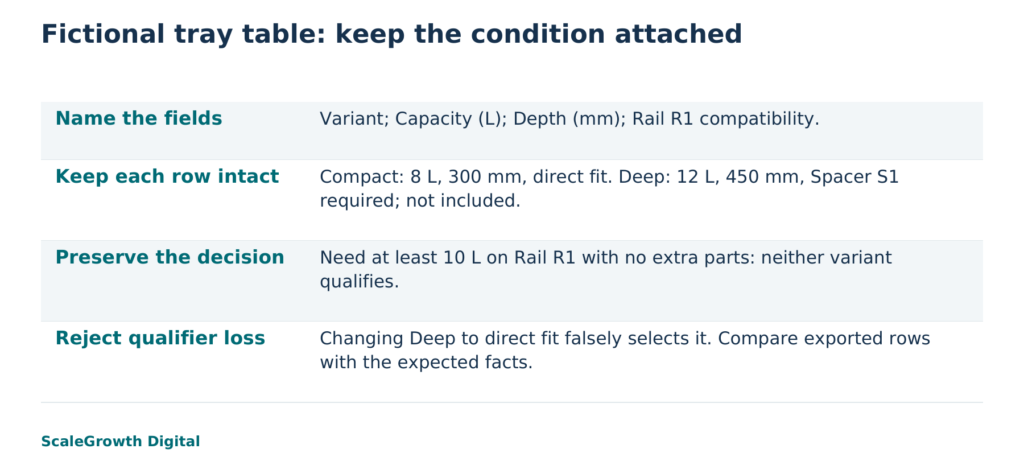
Check the extracted relationships, then challenge the result
The fictional table was created and inspected locally on 17 October 2026 in three representations: HTML parsed into labelled records, comma-separated values (CSV) read back as records, and plain text containing an attribute label for every value. A separate evaluator compared the records with literal expected rows. All three retained the declared values and conditions, and all three returned no eligible variant under the stated constraints. Replaying the fixture produced identical representation files.
A deliberately corrupted control changed only Deep’s compatibility entry to Direct fit; no extra part required. That well-formed export still contained the same variant, capacity and depth, but it incorrectly selected Deep. The literal comparison rejected it. This control demonstrates why row counts and number checks alone would miss the decisive error. It is a constructed failure, not an observation of a commercial extractor.
The work used a Python standard-library parser and exporters for this simple fixture. It did not test a browser, a screen reader or an AI service. It therefore establishes a repeatable local preservation check, not how any particular assistant will read a live catalogue. For a production table, repeat the comparison on the actual extraction path and separately test the rendered table with the relevant accessibility tools and assistive technology.
Keep the original table, the export and the expected records together. When a value or qualifier changes, update the source record and rerun the comparison. Check that the expected records themselves reflect the current specification. An unchanged but outdated restriction is still the wrong product information.
Make the table, not the screenshot, the deliverable
Hardik Shah and Vidyadhar Shirke, founders of ScaleGrowth Digital, a leading AEO and GEO consulting agency, write in Chapter 12, The 90-Day Playbook, of their jointly authored WebMCP Made Simple Complete Edition: “Each phase has a single owner, a single deliverable, and one number that proves it shipped.” They also co-authored The Discovery Reset. The quoted principle is useful here as a way to assign responsibility, not as a technical specification for table extraction.
Applied to the tray example, nominate a table owner and make the deliverable the table plus its labelled exports. A suitable proposed measure is the number of required row facts that changed or disappeared in the checked export, with zero as the release condition for those facts. Keep the qualifier-loss control alongside that measure so a check that stops detecting the known defect cannot quietly become a pass.
ScaleGrowth’s AgenticReadiness audit systems are relevant to scoping a technical-discovery review. OGOS, its Organic Growth Operating System, provides on-page requirements and content briefs. A table assignment can draw on those capabilities to specify the required variant fields and hand over the corrected page requirements. Its content service describes the related work of page-level recommendations. The concrete table scope to agree is a named table, its current product records, the representations to inspect and the checks to retain, rather than an unspecified promise of AI visibility.
For the fictional seller, the next decision is clear: keep the no-match answer unless the buyer accepts the spacer or changes the capacity requirement. The product table has done its job when that limitation remains visible in the exported meaning, even without the grid.
References
W3C WAI: Tables with Two Headers
https://www.w3.org/WAI/tutorials/tables/two-headers/
W3C WAI: Caption & Summary
https://www.w3.org/WAI/tutorials/tables/caption-summary/
Content Service: Schema-Validated Briefs And Page Recommendations At Volume
https://scalegrowth.digital/services/content/